
Radio Streaming – Stream Live Radio on the Internet
Setting up an internet radio station is a very EASY and CHEAP way of creating a live broadcast! We provide premium quality services to help you along the way. To learn more about our services – feel free to browse our site and If you have any questions please contact us.
Streaming packages starting from only $1.50 per day!
- No setup Fees^
- Easy to use web based control panel
- Fallback Stream
- AJAX Media Library
- Great Uptime
- Real-time Statistics
- Live and Auto DJ Options
- Playlist Scheduling
- Reliable and friendly support
- Sponsorship Advertisement Insertion
- Stream Introduction Openers
- Your own start page
- ALL IN ONE, Multi Platform rcPlayer2
Easy to use web based control panel
All users have access to an easy-to-use web-based control panel, allowing you to manage your own streaming server account. You can stop and start your server, manage your server configuration, view data transfer and listener reports, review logs, and obtain access to a variety of information and statistics about your streaming server.
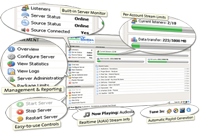
Many other providers will oversell their servers to offer you a cheaper price, we believe this is unfair and simply wrong. We will NEVER engage in this practice and always aim to offer our customers the best possible service available!
Real-time Statistics
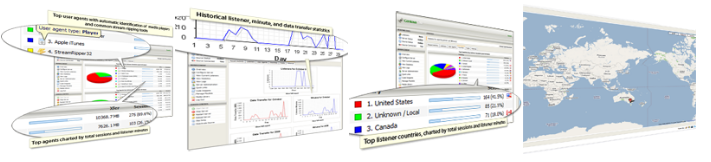
We provide detailed daily and monthly data transfer and listener statistics, complete with graphs, allowing you to track listener trends and resource usage. Reports include :
- Recent Activity
- Listener Overview
- Country Overview
- Listener Tracking, Trends and Resource usage
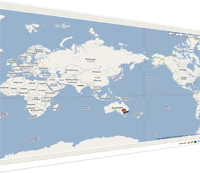
- Live Listener Statistics (See in real time which countries people are listening from)
Stream Introduction Openers
This is a great feature which allows you to upload a pre-recorded mp3 file to our server, this mp3 will played to EVERY listener that connects to the stream, BEFORE the live stream starts.
What does this mean for you?
Quite simply it’s a great way to raise some extra revenue for your station! You can on-sell this space to your advertisers; add it as an inclusion to your advertising pack or sell it as a standalone option, the choice is yours.
Fallback Stream
If for some reason you cannot deliver your stream to our server, we offer you the option to have a fallback stream setup. So if your live stream drops out, the fallback stream will takeover.
There is no need to disappoint your listeners with dead air, give them something to listen to until your live stream reconnects.
AutoDJ
In addition to providing total control over your streaming server, we also provide complete server-side source support (also known as “Auto DJ”). Never again will you need to rely on your own PC to broadcast your stream!
When enabled, you may upload your media (MP3s, etc.) directly to the server via FTP, manage your media through our comprehensive AJAX Media Library system, and schedule your media using our advanced playlist scheduling system.
This provides a complete, all-in-one solution for setting up an Internet radio station.
Your own Start Page
 We can provide each stream with its own AJAX-driven start page, which provides a variety of interactive features and information about the stream. Note: Some of this features are not available for live streams. The features of the start page include:
- Map of listener locations
- On-demand content browser
- Recent track list
- Song requests
- Tune-in links for common media players
- The current track, and stream status
AJAX Media Library
 Our AJAX-driven media library system brings the convenience and usability of a desktop media player’s song management interface to the web.
The layout of the interface is reminiscent of the media library functionality provided by today’s most popular desktop media players. Media can be searched or browsed by artist, album, title, or genre. A track preview feature is also available, which plays a 10-second clip of the selected song(s) to assist in identification. Once located, tracks can be added to a playlist simply by dragging and dropping them on the desired playlist. Through the use of our advanced playlist scheduling system (described below), this drag-and-drop functionality can be used to instantly schedule the selected tracks to play at a given time, or on a repeating schedule.
Playlist Scheduling
 We support multiple playlists for each stream. Each playlist can be configured individually to control precisely how and when it will be played — at a specific time, on a repeating schedule, or on a rotation schedule with support for ranking by popularity (known as “weighting”).
Multi Platform, ALL IN ONE rcPlayer2
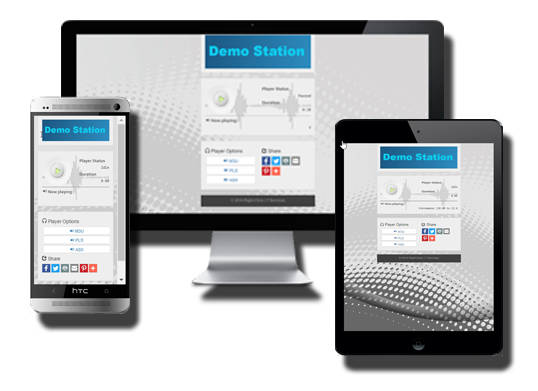 We’re excited to announce the release of our new Radio Player. Its cross-browser, multi platform, mobile device ready! Regardless of the device the listener is using, iPhone, Android tablet or PC, IT JUST WORKS!
Includes social network integration for maximum listener impact.
More details about the player can be found here.


Streaming Plans
 Premium
* Cost per month is calculated “Cost Per Day * 30”
^ Plans terms are minimum 3 months, any term less the 6 months will incur a $65 account set-up fee
– Plan prices are based on a 40Kb/sec stream for the ‘Basic’, and 128Kb/sec for ‘Premium’.
– Per day price for the Premium plan already includes the community broadcaster discount.
If you have any questions or wish to order a package please Contact us.